Avoid These 5 Common Mistakes When Designing Digital Training
There is a big shift in training from face-to-face to digital. Here are the 5 most common mistakes I see when working with organisations, instructional designers and trainers with suggestions on how you can avoid them.
Mistake Number 1
Forgetting the purpose of the training
 The purpose of training being:
To bridge a performance gap when the gap is caused through lack of skill or lack of knowledge
nb – lack of knowledge is not about recalling facts and figures. Rather it’s the application of knowledge.
The mistake with digital training is that all good training design seems to be forgotten when we start to design. For instance, we wouldn’t think of designing a face-to-face training without:
- Identifying the performance gap and then determining whether training could be the solution.
- Agreeing the observable outcomes
that
the organisation expects learners to apply as a result of the training. - Getting Management Buy-In and Line Managers
commitment
to ensuring learners apply their learning back in the workplace.
Yet, when it comes to digital training, someone says, “Can you create an eLearning/digital lesson on x” and away we go – converting our slides to whatever digital platform we use.
Next time you’re asked to create a digital training
Determine whether the request is really a training need or just general information. If it’s general information, by all means create a ‘good looking’ digital message. If it’s true training, then follow good training design principles as you design a digital solution. Include:
- How you’ll test within the digital training that learners are able to do what the organisation expects as a result of the training.
- Getting
commitment
from Line Managers to ensure their team members apply their learning from the digital training. - You create workbooks and handouts for learners to use within the digital training.
- You design so that learners are actually applying learning for 70-80% of the time that they are within the digital training.
Mistake Number 2
Including too much content
Because we tend not to think of digital training as real training, we produce digital reading. In other words, we pack the digital training with text (or a talking head video).
Think about it, in a typical face-to-face training day, you will have 5 maybe 6 modules, each with their own behavioural based objective. When you digitise your training, if you have 6 modules in a day that you are digitising, then you will have 6 individual modules in the digitalised version, each with its own behavioural based objective. You can always group these together as a series. But the common error here is to produce one digital training that covers the entire training.
Next time you’re asked to create a digital training
- Design each piece of digital training with ONLY ONE behavioural based objective that you test within the digital training.
- If the training requires several objectives, design training that is made up of a series of short digital modules.
- To complete a series of modules, there may be a mix of digital lesson, eLearning and webinar.
Mistake Number 3
Decide upon the media first, then desperately try to insert the content!
Media may be part of the solution, but training must focus upon the business
needs
Go back 30 years in training and typically the first thing we did when designing a training solution was to produce the overhead slides (the media). Little wonder that there was so little interaction during training, it was so difficult to try and fit it in once you were constricted by the slides.
I feel that most face-to-face training has moved on since those days. I see training designers now:
- Determining what learners need to be able to do.
- Creating learning experiences and practice to facilitate learners performing the skills or applying the knowledge during their training.
- Then, producing any supporting materials such as overhead visuals, workbooks etc
BUT, a common mistake with digital training is to:
- Determine the media – Digital Lesson, eLearning, Video, Webinar etc
- Create the textural content.
- Struggle to insert activities, practice or full performance testing
Not everything can be taught digitally. A handy thing to remember is:
If you cannot test it digitally, you cannot teach it digitally.
Consider, if it’s not worth testing, it’s not worth teaching!
nb – testing here is not about the recall of information but the application of that information.
Next time you’re asked to create a digital training
- Determine if the training can be tested digitally. If No, then it has to be done face-to-face. If Yes, then create the learning interactions and testing BEFORE incorporating any content text, video or sides.
- If training can be tested digitally, then consider the best media to use for facilitating the learning process such as a ‘How To’ digital lesson, a ‘Decision Making’ eLearning module or a ‘Collaborative’ webinar.
Mistake Number 4
Thinking that the brain learns differently when exposed to digital training
It Doesn’t!!
Learning follows the same process ie content needs to pass the 3 filters in the brain to make it to Long Term Memory WITHOUT being discarded during the process:
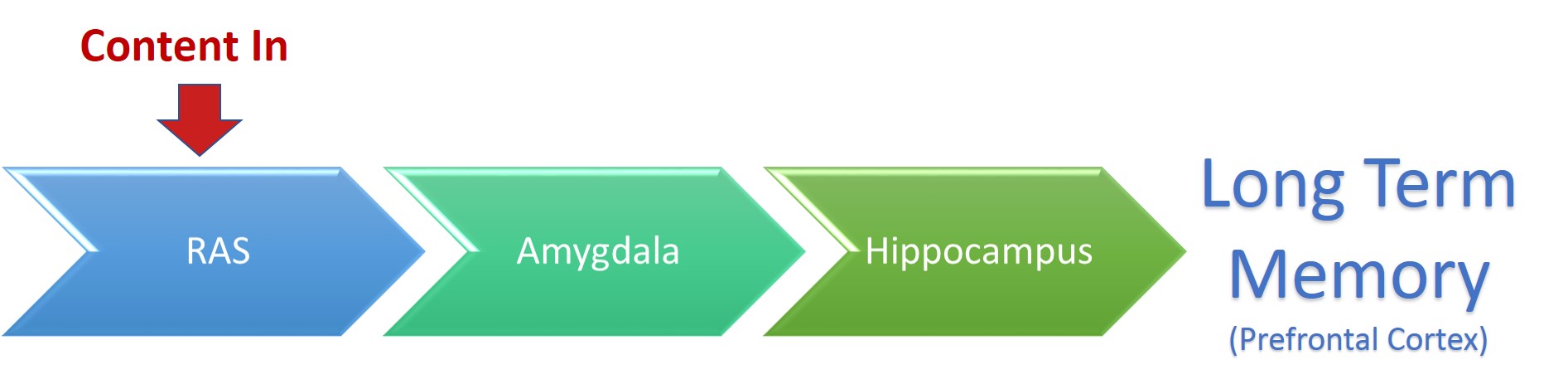 RAS – Reticular Activating System
RAS – Looks for change which might signal danger. Anything that involves change will be passed directly to the Amygdala. Where everything stays the same there is no danger, so it can be ignored and discarded. So, if all your digital training is doing is offering some reading and then to press next, the RAS sees no change and will start to discard the content.
Amygdala – Looks for danger. If danger is perceived it shuts down higher level thinking and focusing upon running away, fighting or freezing. If the passed content doesn’t offer danger, then it passes it to the hippocampus.
Hippocampus –
- Looks for patterning ie is there something already stored to link to this new content
- Looks at how often during the day the new content is used.
If there is nothing to link the new content to, then it may be discarded. If it’s not used during the day then it’s deemed unimportant and discarded through useful forgetfulness as you sleep.
Next time you’re asked to create a digital training
- Design to include change. Include:
-Making notes on a placemat or within a workbook.
-Visit a website to find information.
-Involving their manager or colleague for parts of the content.
-Analyse a video.
-Complete a case-study and send it to the trainer.
-Add curiosity and
surprise. - Add positive emotions.
- Design
to pass the hippocampus:-Use priming/pre-exposure to introduce content to learners prior to their digital training so that you can facilitate the linking of the new content to what the brain already has.
-Use review techniques to ensure content is used more than once.
-Use application activities to continue using content.
-Emphasise the WIIFM from the learners perspective.
-Utilise Action Planning.
Mistake Number 5
I don’t like digital training!
“I’m a face-to-face trainer where I can see the expressions on my learners faces and interact with the group. I don’t like being unable to interact, so I don’t like digital training.”
Firstly, remember that the training is not about us as trainers but its all about the competencies and convenience of our learners.
There could also be sub-text here:
- I’m afraid that I don’t have the skills to create digital training.
- I’m afraid that if everything is done in a digital format that my role will become redundant.
Well, the role of the trainer is definitely evolving. We are moving towards being the producers of learning rather than just the facilitator of training. So, like any shift or change, there are new things to learn – but the technical skills are easy, we already have the skills and experience of a trainer which is much more difficult to acquire.
Now working almost entirely upon developing blended learning pathways, I can say, “Rest assured, if you embrace the changes that are happening, your role will be in more demand than ever before – although it might look slightly different.”
Next time you’re asked to create a digital training
- Embrace the opportunity and apply all your training design and facilitation skills to create a unique and exciting digital experience for your learners so that they leave feeling ready to apply the new ideas and that they are confident to apply them.
Call to action |
|---|
| When you design digital training, follow all your design principles you would normally apply to face-to-face training – the training isn’t different, just the method of transfer. Select the method of transfer after you’ve designed the training. |
Writen by David Gibson – Eureka
Click here to join Tips For Trainers for Free